
More than half of your mobile visitors leave before they read a single word. Google's mobile research puts the figure at 53 percent, the share of people who abandon a page that takes longer than three seconds to load, and most sites cross that line without the owner ever noticing the loss. The gap between a tap and a usable screen is not a design preference or a nice-to-have. It is the exact moment a visitor decides to stay and become a customer or leave and become someone else's. Google's Core Web Vitals framework puts hard numbers on that moment: a Largest Contentful Paint under 2.5 seconds rates Good, 2.5 to 4 seconds needs improvement, and anything past 4 seconds rates Poor. I rebuild slow sites for a living, and the revenue difference between those bands is not subtle.
Page speed decides who reads your offer and who never sees it. Google's own research ties every added second of load time to higher bounce risk and lower conversion, and the damage gets steeper the longer people wait. Most slow sites run slow because of how someone assembled them, not how they styled them: heavy page builders, render-blocking files, oversized images, and third-party scripts stack up until the browser cannot draw the page fast enough. Fix the infrastructure and the numbers move. Verdict: treat speed as an architecture decision, measure it with real-user data, and stop patching around a foundation that was never built to be fast.
What Happens in the First Three Seconds
The first three seconds decide the visit, and the browser spends almost all of them working before the visitor sees anything. When someone taps your link, their device resolves your domain, opens a secure connection, and downloads the HTML. That HTML is only a set of instructions. The browser then has to fetch every stylesheet, script, and font the page references, parse them, build a render tree, and calculate layout before it can paint the first pixel of real content. Each of those files is a separate round trip across the network.
On a strong office connection this happens fast enough that most visitors will not notice. On a mid-range phone riding a congested mobile network, which is how most of your traffic actually arrives, every extra file and every extra kilobyte adds real time to that sequence. The user is not looking at your headline during those seconds. The user is looking at a white screen and deciding whether you are worth the wait.
This is the part owners never watch, because they load their own site from a fast laptop with everything cached. Their visitors do not get that version. A blank screen is a closed door.
Core Web Vitals in Plain Business Terms
Google measures the experience with three numbers, and once you understand them you can hold any developer to account. The first is Largest Contentful Paint, or LCP, which marks the moment the largest piece of content, usually your hero image or headline, finishes rendering. Google rates LCP under 2.5 seconds as Good and anything past 4 seconds as Poor, measured at the 75th percentile of real visits. The second is Interaction to Next Paint, or INP, which tracks how quickly the page responds when someone taps or clicks. Google's Good threshold for INP is 200 milliseconds; past 500 milliseconds it rates Poor.
The third is Cumulative Layout Shift, or CLS, which scores how much the page jumps around while it loads. You have felt bad CLS yourself: you go to tap a button, an image loads above it, the whole layout shoves down, and you tap the wrong thing. Google rates a CLS score of 0.1 or lower as Good. These are not academic metrics. Google uses field data on all three as a ranking signal, so a slow site loses twice, once at the search result and again at the visitor.
Owners hear "Core Web Vitals" and assume it is a developer's problem to file away. It is a revenue scorecard written in plain arithmetic. Learn the three thresholds and you can audit any site in a minute.
What a Fast Custom Build Changes
A site built lean from the first line does not fight these problems, because it never inherits them. When the only code on a page is the code that page actually needs, there is nothing extra to defer, nothing extra to block the paint, and nothing extra to compete for the main thread. Scripts get deferred by default. Fonts get self-hosted and preloaded. The critical styles sit inline in the head, images ship in modern formats at the size they display, and every image carries its dimensions so the layout never jumps. Render blocking becomes an exception to catch in review, not a condition to manage forever.
The result is a page that paints in about a second on the same phone where the bloated version took four. That is the difference between the Portent band that converts at 3 percent and the band that converts at well under one. I have watched that shift land on real sites, and the LCP number and the sales number move together because they were always the same story told twice.
Speed at this level is not a plugin you install at the end. It is a decision you make at the beginning, and it compounds in your favor for as long as the site is live.
The Line Between Load Time and Revenue
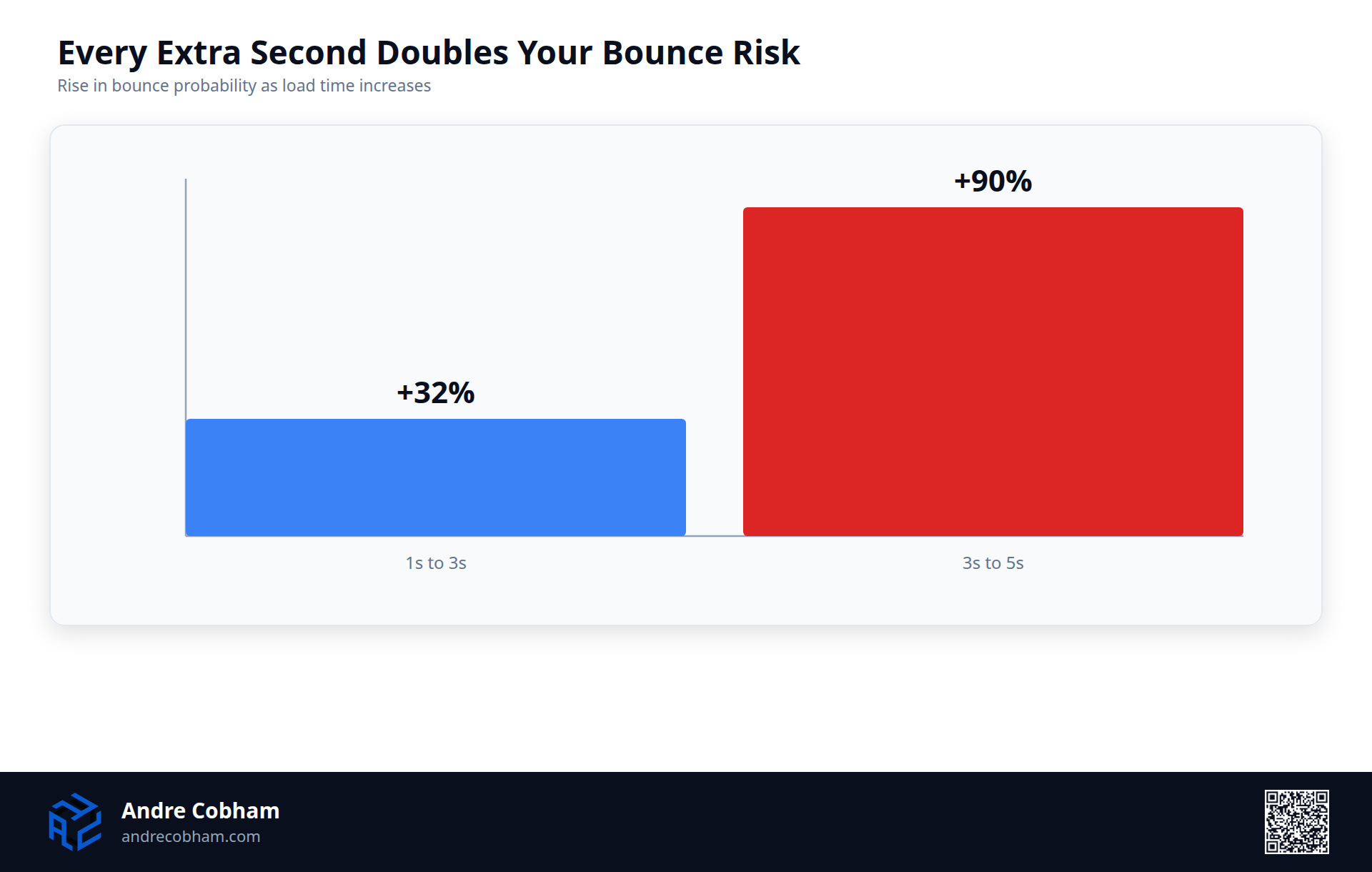
Speed and revenue move together, and the relationship is not a coincidence you can wave away. Google's mobile benchmarks show the probability of a bounce climbs 32 percent as page load stretches from one second to three, and 90 percent as it stretches from one second to five. The curve steepens the longer people wait. Portent's analysis of roughly 100 million page views found the same shape on the conversion side: sites that loaded in one second converted at 3.05 percent, while sites that took four seconds converted at 0.67 percent. Every additional second pulled paying customers out of the funnel before they reached a product or a form.
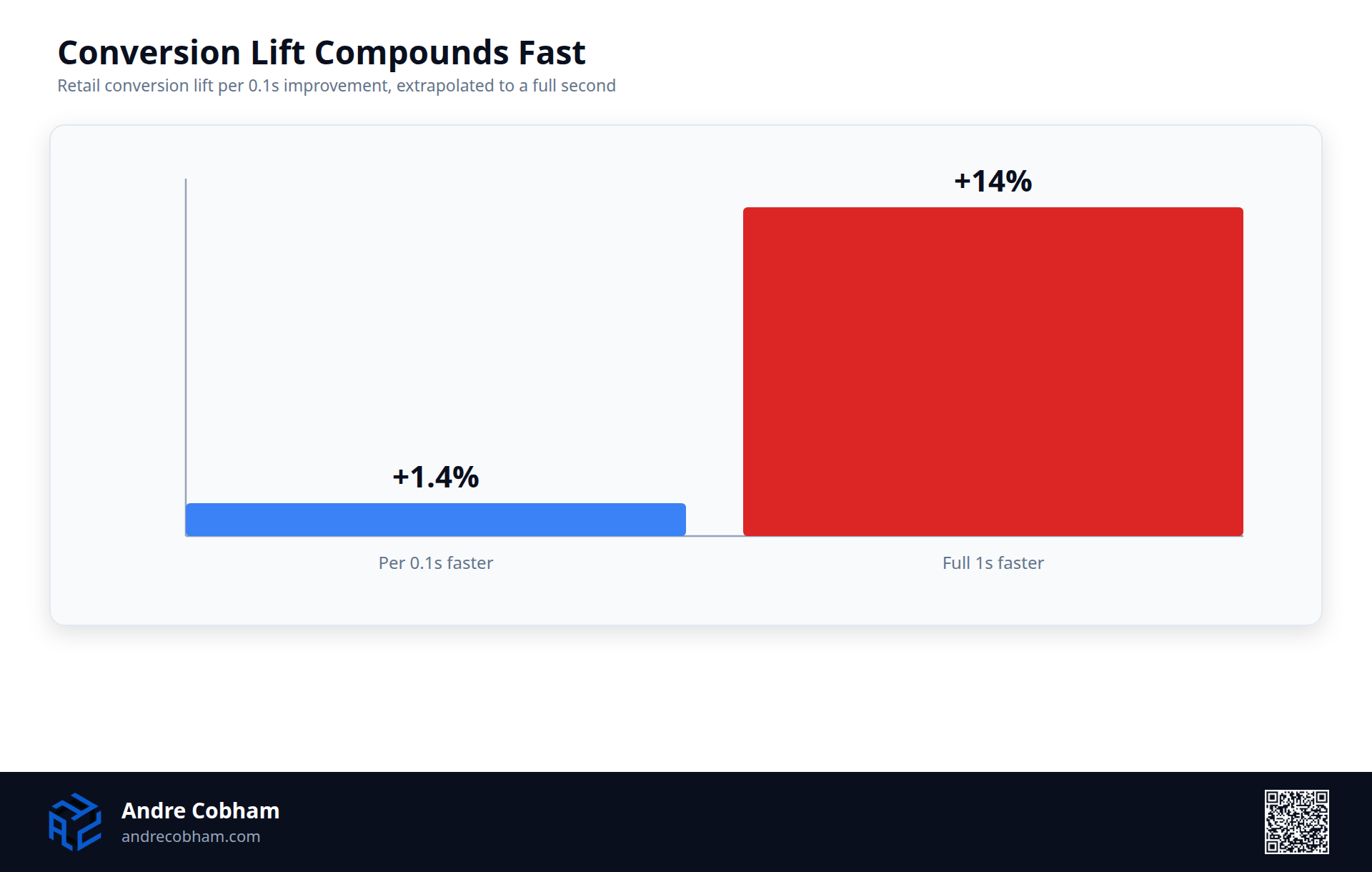
The usual objection is that this is correlation, not cause. The skeptic argues that fast sites simply belong to better-run companies, so speed is a marker of competence rather than a driver of sales. The Google and Deloitte "Milliseconds Make Millions" study closed that loophole by measuring the same brands as their own speed changed across 30 million sessions. A 0.1 second improvement in mobile load time lifted retail conversions by 8.4 percent and average order value by 9.2 percent. Same brand, same customers, same product, one tenth of a second faster.
That is the whole argument in one figure. A slow page is not a neutral cost of doing business. It is a discount you are handing your competitors.
What Render Blocking Actually Does
Render blocking is the single most common reason a page sits blank longer than it should. The browser reads HTML from top to bottom. When it hits a stylesheet or a script in the document head without a defer or async attribute, it stops cold. It refuses to draw anything on screen until that file finishes downloading and parsing. Your visitor has the full HTML on their device already, but the browser is holding the paint hostage while it waits on a blocking file.
A font stylesheet loaded from an outside provider is a textbook case. That one line in the head fires a fresh DNS lookup, a TLS handshake, a request, and a response to a third-party server, all before the browser draws a single character. An 80 kilobyte stylesheet pulled in synchronously does the same on its own. On a slow phone, one blocking file can push first paint past the three-second mark where half your audience gives up.
The fixes are well understood. Defer non-critical JavaScript so it downloads in the background and runs after the HTML parses. Self-host fonts so the browser draws text over a connection it already trusts. Inline the handful of styles the top of the page needs and load the rest asynchronously. None of that is exotic. It just has to be built in from the start.
Why Page Builders Are Usually the Culprit
Most of the slow sites I inherit are slow for the same reason: a general-purpose page builder is loading code for features the page never uses. A typical WordPress install stacks a heavy theme on top of a visual builder on top of a dozen plugins, and each of those pieces injects its own CSS and JavaScript into every page. The contact-form plugin loads its scripts on your About page. The slider library loads on pages with no slider. The browser downloads and parses all of it before it can finish the paint.
The weight this produces is measurable. The HTTP Archive Web Almanac puts the median mobile page at roughly 2.5 megabytes, with JavaScript and images carrying most of that load. That is the middle of the pack, not the worst case. It is the ordinary result of assembling a site from parts that were each designed to work anywhere and therefore optimized for nowhere.
Owners usually read this as a hosting problem and go shopping for a faster server. A bigger server does not delete two megabytes of render-blocking assets; it just ships the same bloat a little quicker. The weight is structural, baked into how the site was put together. You cannot buy your way out of an architecture decision.
Images, Fonts, and Third-Party Scripts
Three categories of asset cause most of the remaining damage, and all three are fixable. Images are the heaviest thing on the median page, and the common mistakes are uploading a 3000 pixel photo to display it at 600 pixels and serving old formats instead of modern ones like WebP or AVIF. An image tag without width and height attributes causes a second problem: the browser does not reserve space for it, so the layout jumps when it arrives, and your CLS score suffers along with the reader's patience.
Fonts are the quiet tax. Every custom web font is another file to download, and when a site pulls fonts from a third-party host it pays for a separate DNS lookup and handshake before any text can render. Third-party scripts are the worst offender for interactivity. Analytics tags, chat widgets, tracking pixels, and A/B testing tools all run on the main thread, and each one competes for the same processor the browser needs to respond to a tap. That contention is what drives INP past Google's 200 millisecond threshold and makes a page feel sticky even after it looks finished.
The pattern across all three is the same. Making a site slow is never the plan. It happens because someone keeps adding one more script, one more font, one more unoptimized image, until slow became the unmeasured default.
How to Measure This Without Guessing
You cannot fix what you refuse to measure, and measuring speed correctly takes two kinds of data. Start with Google's PageSpeed Insights. Paste in any URL and it returns two things: lab data from a controlled test, useful for diagnosing specific problems, and field data drawn from the Chrome User Experience Report, which is what real Chrome users actually experienced on your pages over the past month. That field data is the version that counts, because it reflects real devices on real networks at the 75th percentile, not your laptop on office wifi.
The field view tends to correct a comforting illusion. Owners load their own site, it feels quick, and they conclude the speed complaints are overblown. They are testing on a fast phone, a fast connection, and a warm cache, which is the best case almost none of their visitors get. The Web Almanac's 2024 data shows only 43 percent of mobile sites pass all three Core Web Vitals, so the odds are against the site feeling fast to the people who matter.
Run PageSpeed Insights on your top five pages and read the field data first. If those numbers are red, your visitors are living the red version whether or not it feels that way to you.
My Take
You cannot patch your way to fast when slow is built into the foundation. I have spent real hours trying to claw seconds back from a heavy WordPress build, adding a caching plugin, then a second plugin to fix what the first one broke, then a paid optimization service to compress what the theme kept re-inflating. It buys a marginal improvement and a more fragile site. The blocking assets, the unused code, and the third-party sprawl are still there, because they are what the platform is made of.
When speed is the actual goal, I build lean and skip the whole cycle. A custom front end that loads only what the page needs beats a plugin-stacked builder on every Core Web Vital, and it stays fast because there is no accumulated weight quietly slowing it down. Patching manages the symptom and grows the maintenance bill. Building removes the cause. If more than half your mobile visitors leave before the page loads, you do not have a tuning problem. You have a foundation problem, and you fix a foundation by rebuilding it.
If your site fails the three-second test, the fix starts with an honest measurement and an architecture built for speed instead of patched toward it. That is the work I do. Tell me about your site and I will show you exactly where it is losing customers and what a fast rebuild would change.