
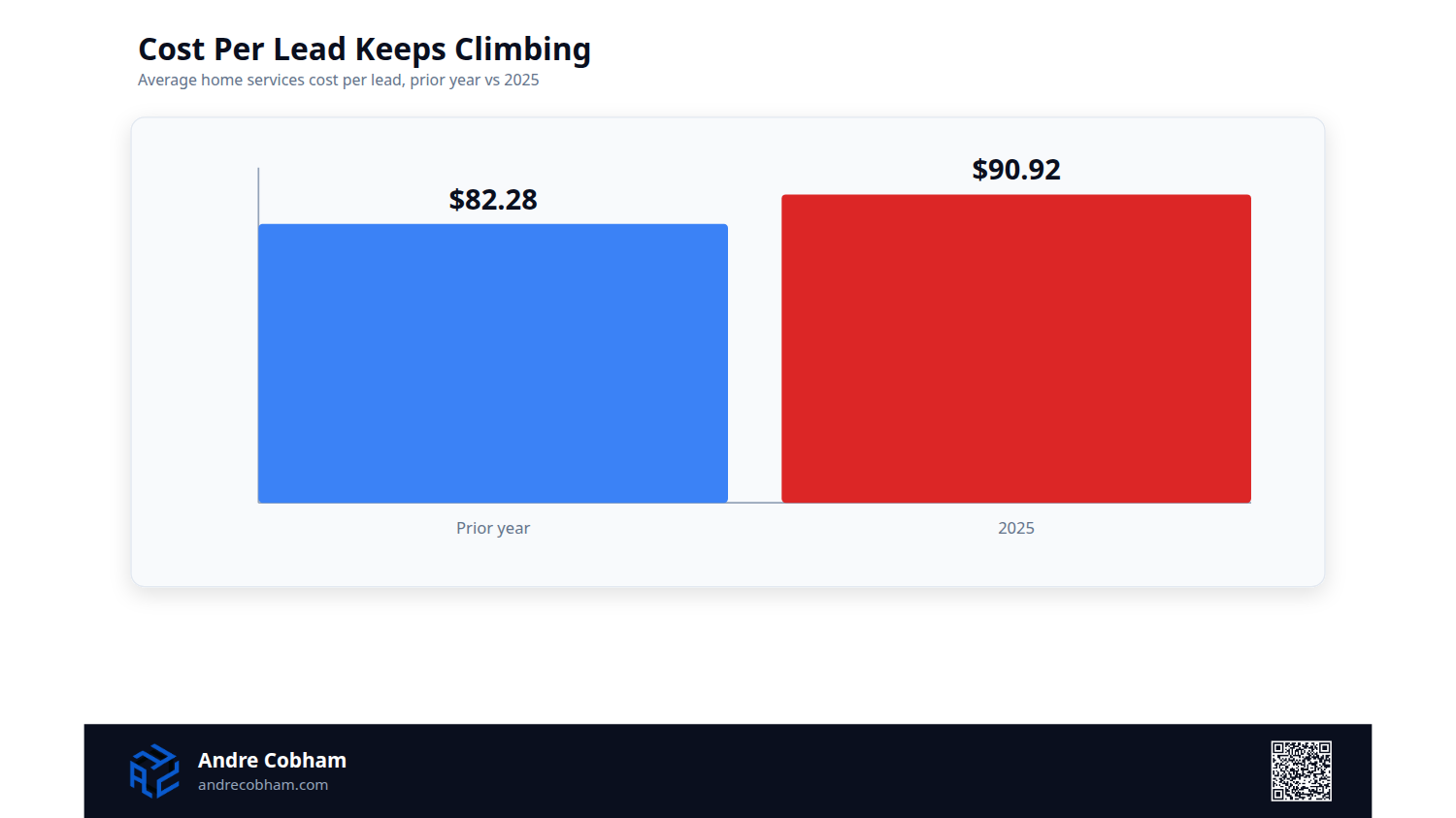
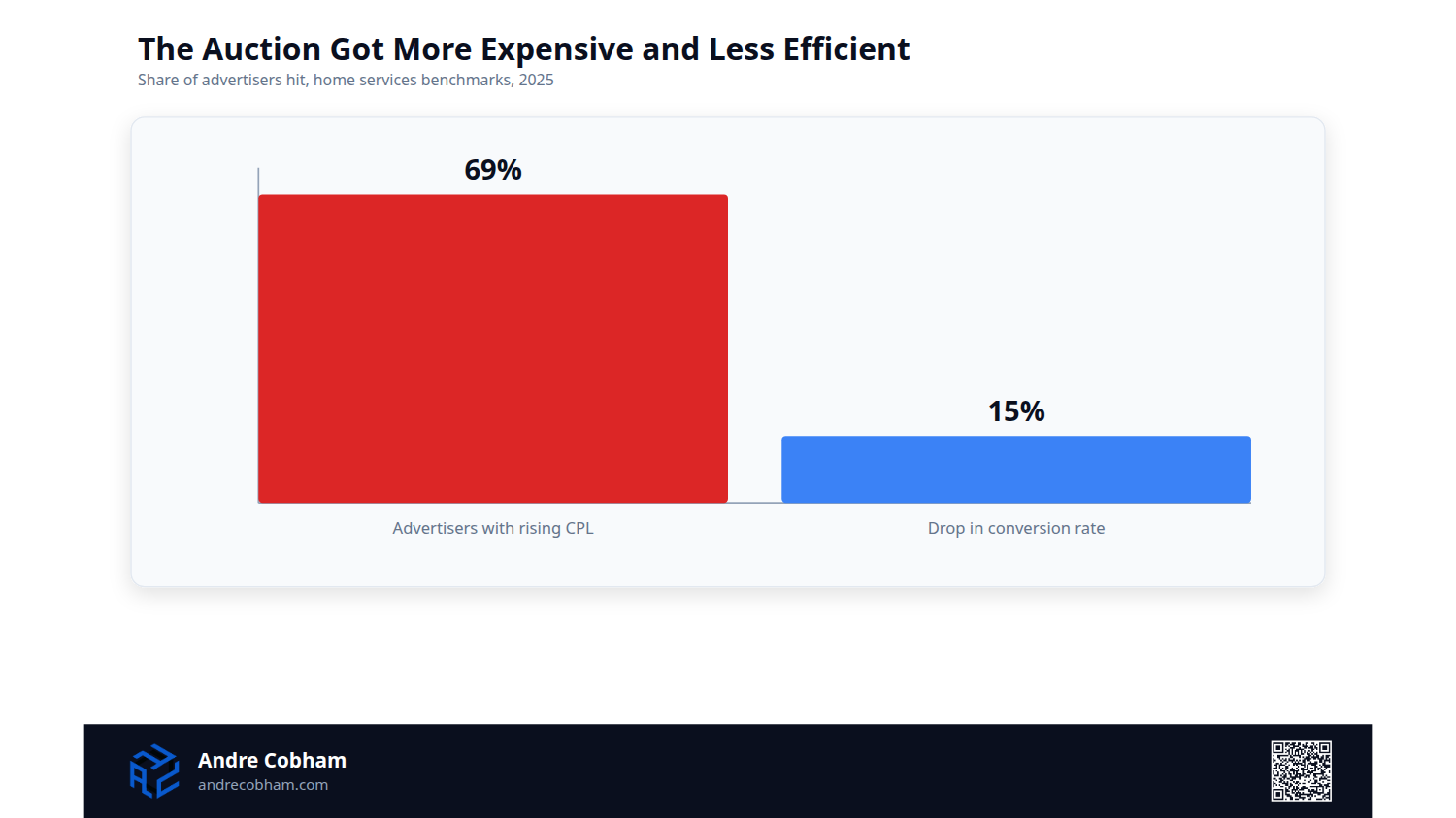
You run ads. The same lead costs more this year than it did last year. You did not get worse at your job. The auction got more expensive, and it will do it again next year. LocaliQ's 2025 home services benchmarks put the average cost per lead at $90.92, a 10.51 percent jump year over year, and cost per lead rose for 69 percent of home services advertisers. Conversion rates fell almost 15 percent over the same window. You are paying more and closing less. That reads like a market problem. It is a structure problem, and structure is the part you own.
Cost per lead rose for 69 percent of home services advertisers last year, up 10.51 percent on average, while conversion rates dropped almost 15 percent. More budget does not reverse that, because budget buys more of the same crowded auction at the same rising price. The fixes are structural. Separate urgent demand from routine demand, count booked jobs instead of raw form fills, feed those booked outcomes back into bidding, and put pay-per-lead next to pay-per-click. None of it costs a dollar more. It changes what your dollar buys.
Cost Per Lead Is an Output, Not a Setting
Treat your account as a system, and cost per lead is the number the system reports at the end. It is not a dial you turn. When you bid on "emergency plumber near me," you are not buying a lead from Google. You are buying a slot in a live auction against every competitor in your ZIP code. Each year more of them enter that auction and their quality scores sharpen. The room fills up. Your price to stand in it climbs.
The wrong read is that a rising cost per lead means you need a bigger budget. Budget buys more of the same expensive auction at the same price. WordStream's 2026 benchmarks put the average cost per click for the home and home improvement category at $8.33, so every unqualified click you fund is more than eight dollars you will not get back. The accounts that hold their numbers flat are not out-bidding the room. They stopped competing in the parts of it that do not pay.
Separate Urgent Demand From Routine Demand
"Same day AC repair" and "HVAC maintenance plan" are two different customers. One has warm air blowing and a house full of people. One is comparison shopping for spring. They convert at different rates, close at different values, and tolerate very different costs per lead. Put them in one campaign under one budget and the bidding algorithm does the rational thing. It pushes spend toward the cheaper conversion, which is almost always the low-intent routine search. Your highest-value traffic, the emergency, gets starved by your own account.
Splitting them is one of the first moves I make in an audit, and it adds nothing to the spend. Emergency and routine terms go into separate campaigns, with separate budgets, separate ad copy, and separate landing pages. Now the emergency campaign holds its own budget that the routine keywords cannot drain. Split the intent and the money you already have starts funding the work that actually pays.
Count Booked Jobs, Not Raw Conversions
A campaign optimizing toward the cheapest conversion will report a falling cost per lead while your booked jobs stay flat. A form fill from someone who never answers the follow-up is a conversion. A three second call that hangs up before hello is a conversion. Neither one is a lead. You are paying to manufacture a number that has no line to revenue, then wondering why the number looks good and the calendar looks empty.
Wire your conversion tracking to real conversations. Call tracking with duration filtering counts a call only after it passes a set length, so a thirty second floor keeps the misfires out of the data. CallRail reports conversions based on call length and lets you set that threshold per campaign. I put it where a productive first conversation actually begins, usually between thirty and sixty seconds for a service call.
Once the number on the screen means a human talked to your office, every decision downstream of it gets honest. Fix the definition of a lead before you argue about the price of one.
Feed Booked Outcomes Back Into Bidding
Counting real calls is step one. Step two is telling Google which of those calls turned into paid work. Smart Bidding optimizes toward whatever you label a conversion. If the label stops at the form fill, the algorithm gets very good at buying form fills, including the tire kickers and the wrong numbers. It has no idea which clicks became revenue, so it cannot go find you more of them.
Offline conversion import closes that loop. Google's own documentation describes it plainly. Google assigns a Google Click ID to every ad click, you store that ID with the lead, and when the job books in your CRM you send the ID back with the outcome and its value. Now the bidding sees the booked job, not the raw inquiry, and it shifts budget toward the keywords, times, and audiences that produce paying customers instead of paperwork.
This is the single highest-leverage change I make on a mature account, and most owners have never switched it on. Optimize to booked revenue and the auction starts working for you instead of against you.
Put Pay-Per-Lead Next to Pay-Per-Click
Google Ads charges you per click. Someone taps your ad, bounces in five seconds, and you paid full freight for it. Google's Local Services Ads invert that. They sit above the regular search ads with a Google Verified badge, and you pay per lead, not per click. In Google's own words, you "only pay when potential customers get in touch." No contact, no charge.
I do not treat Local Services Ads as a replacement for search. I treat them as a second channel that competes with pay-per-click on one number, cost per booked job. The billing model alone removes the most expensive line in a search account, the clicks that were never going to call. The Google Verified badge does the rest, because a homeowner choosing between five plumbers trusts the one Google checked out over the four it did not.
Run both channels, measure both to the booked job, and let the cheaper one earn more of the budget. That is not loyalty to a platform. It is arithmetic.
Quality Score Is a Price Lever
Two businesses bid the same dollar on the same keyword and pay different prices for the same position. Google ranks ads on bid times quality, so a higher quality score buys you a lower cost per click at the same rank. Quality score runs one to ten and rests on three inputs: expected click-through rate, ad relevance, and landing page experience. Ignore it and you hand the auction a premium your sharper competitor never has to pay.
The fix is unglamorous and it works. Tighten your ad groups so a handful of closely related keywords share ad copy that names the exact service. "Water heater replacement" belongs with "install new water heater," not stuffed into a general plumbing ad group next to drain cleaning and slab leaks. When the keyword, the ad headline, and the landing page all say the same thing, expected click-through rate and relevance climb, and the price of the click falls.
Quality score is the one lever that lowers your cost without touching your bid or your budget. Earn the score and the discount follows.
Negative Keyword Hygiene
Your search terms report is the most honest document in the account, and most owners never open it. Broad and phrase match pull in searches you never intended to buy. "Free," "cheap," "salary," "jobs near me," "how to fix," "DIY," and warranty hunters all land on the same ad and burn the same dollars. Every one of those clicks is a conversion you will never book, bought at full retail.
Pull the search terms report every month, sort by cost, and read the queries that spent money without converting. Add the junk as negative keywords. Build one shared negative list for the obvious offenders, "free," "jobs," "salary," "training," "reviews," "complaints," and apply it across every campaign. For a specialist, exclude the services you do not offer, so a commercial HVAC shop stops paying for residential window-unit searches it cannot serve.
A clean negative list is not a one-time project. It is a monthly habit that quietly lowers your average cost per lead by keeping the spend on searches that can actually book a job.
Tighten the Geo Radius and the Clock
For emergency intent, a lead you cannot serve is not a lead. Advertise "emergency plumber" across a forty mile radius when your crew cannot reach the far edge within the hour, and you pay top-of-auction prices for calls you have to turn down. Pull the radius in to the area you can actually dispatch to fast, fifteen or twenty miles for most trades, and the wasted spend at the edges disappears.
Then look at the clock. Emergency demand does not run nine to five. Pipes burst at midnight and air conditioners die on Saturday afternoon, and that is exactly when many competitors pause their ads. Bid up when the urgent searches spike and your rivals go dark. For routine, non-urgent services, do the opposite, and stop funding two in the morning clicks for a maintenance plan that does not get booked at two in the morning.
Geo and schedule are two settings and ten minutes of work, with zero added budget. They point the money you already spend at the calls you can actually win.
Match the Landing Page to the Query
The click is not the finish line. The booking is, and the landing page decides which one you get. Send "emergency AC repair" traffic to a generic homepage and the visitor has to hunt for a phone number while the house bakes. They bounce, you paid for the click, and the conversion rate LocaliQ already shows falling almost 15 percent falls a little further inside your account.
Match the page to the promise in the ad. Emergency traffic lands on an emergency page with the phone number above the fold, a one-line promise of fast response, the service area, and nothing else competing for the eye. Routine traffic lands on a page built to educate and quote. Message match lifts conversion rate, and because landing page experience feeds quality score, it lowers your cost per click at the same time.
You already paid for the click. The page is where you decide whether that money books a job or funds a bounce.
What to Check This Week
Five moves, before you add a single dollar to the budget.
One. Pull the search terms report. If emergency and routine searches share a campaign, split them, and add the obvious junk queries as negatives while you are in there.
Two. Open your conversion actions. If you count form fills or calls with no duration threshold, set a thirty second floor before you trust the cost per lead number again.
Three. Check whether offline conversion import is on. If booked jobs from your CRM are not feeding back into bidding, that is your highest-leverage fix in the account.
Four. Look at your geo radius and ad schedule. Trim the radius to what you can dispatch, and bid up on the hours your emergency customers actually call.
Five. Click your own ads. If a specific service query lands on a generic homepage, build the page that matches the search.
None of these moves cost money. All of them change what your money buys.
My Take
Here is what I tell an owner who shows up with a rising cost per lead and a plan to cut the budget. Cutting spend on a leaking account does not fix the leak. It buys less of the same waste. I have audited enough service accounts to know the number almost never climbs because the market got expensive on its own. It climbs because the account blends intent, optimizes toward misfires, pays per click in a trade where pay-per-lead exists, and hands the auction a quality-score premium it never had to pay.
Fix the structure and the same budget books more work. That is the whole argument. The businesses holding their cost per lead flat while their competitors' climbs are not spending more or bidding smarter. They built an account that refuses to pay for the parts of the auction that never convert. Budget is not the lever. Structure is.
A rising cost per lead is your account telling you where it leaks. You do not out-spend a leak. You close it. If yours has climbed for more than a year running, reach out and we will look at what your account is actually doing with your money.