Building every new client automation on Google's API stack first for six months and documenting what worked, what broke, and what the actual cost looked like at production volume. Not benchmark scores. Dollars per task completed, at the quality level a real business operation can use. The production results change how the first conversation with every SMB client gets scoped.
In my opinion, running on Google Workspace since before it was called that. The productivity layer, the integrations, the API surface built around it have been the operating foundation for every client engagement I run. When Gemini API launched with tiered model access, testing started against real workflows, with real data, at real volume. Here is what six months of billing and production results across client deployments actually showed.
Google has the most price-accessible AI stack for SMBs right now. Six months of production testing across Gemini Flash, Pro, Nano, Imagen, and Veo confirms the cost-per-task ratio for the workflows small businesses actually run outperforms every other provider at this tier. Flash is the correct default model for most automation tasks, not a compromise. The free API tier is a fully functional testing environment, not a preview. Businesses already on Workspace are positioned to deploy agents against their existing data without a new infrastructure deal.
What Pricing Actually Tells You About Which Model to Use
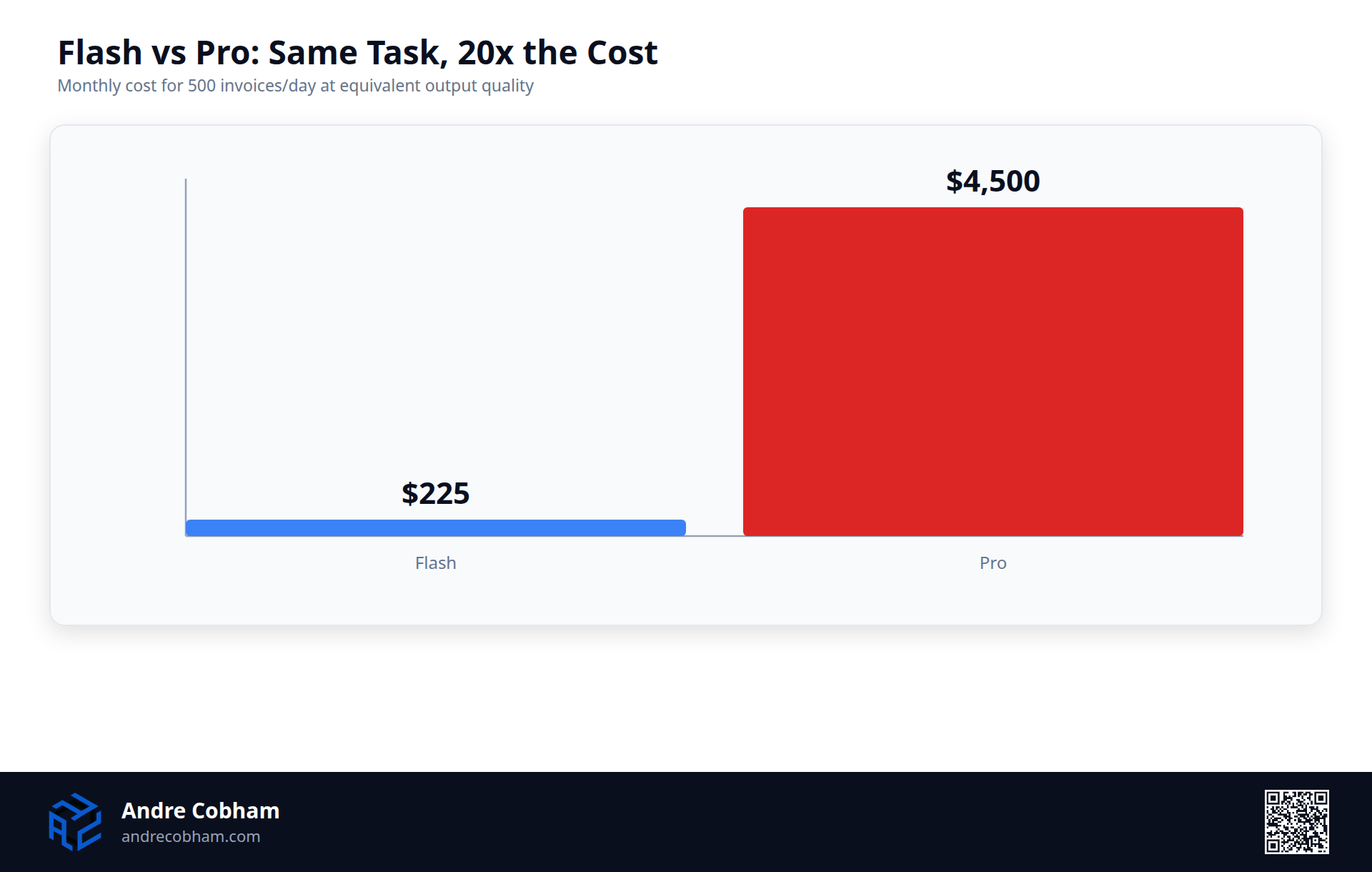
The first question in every client conversation is not which model to choose, but what you are paying for. Gemini 2.5 Flash costs $0.075 per million input tokens and $0.30 per million output tokens. Gemini 2.5 Pro costs $1.50 per million input tokens and $6.00 per million output tokens. That is a 20x difference on input and 20x on output. That number gets said out loud in every discovery call because it changes how clients think about model selection entirely.
An invoice extraction task that processes 500 invoices per day, each with 2,000 tokens of input and 300 tokens of output, costs you roughly $7.50 per day on Flash or $150 per day on Pro at equivalent quality. That difference compounds into $225 per month, or $2,700 per year, for the same output quality. That exact workflow was built for a client last quarter. The business was already committed to building it. The question was only which model to use. We validated the output quality on Flash first, on the free tier, before any budget was committed at all.
Flash Is Not a Compromise. It Is the Correct Tier.
Recommending Flash over Pro is not recommending worse results. Six months of production testing on invoice extraction, lead classification, email triage, and content generation shows Flash delivered required quality. Failures came from prompt engineering, not model capability.
Businesses overspending default to Pro for tasks that do not require it. A support ticket workflow routing 500 tickets per day does not need Pro. It needs a well-engineered prompt on Flash. At 5,000 tickets per day, the cost difference changes what the business can afford to build.
The practical rule: start every new automation build on Flash. Only escalate to Pro if the failure rate on Flash, after prompt refinement, is still above the threshold that makes the automation unreliable at production volume. Across six months of client builds, escalation to Pro was needed once.
Latency and Context Caching in Production
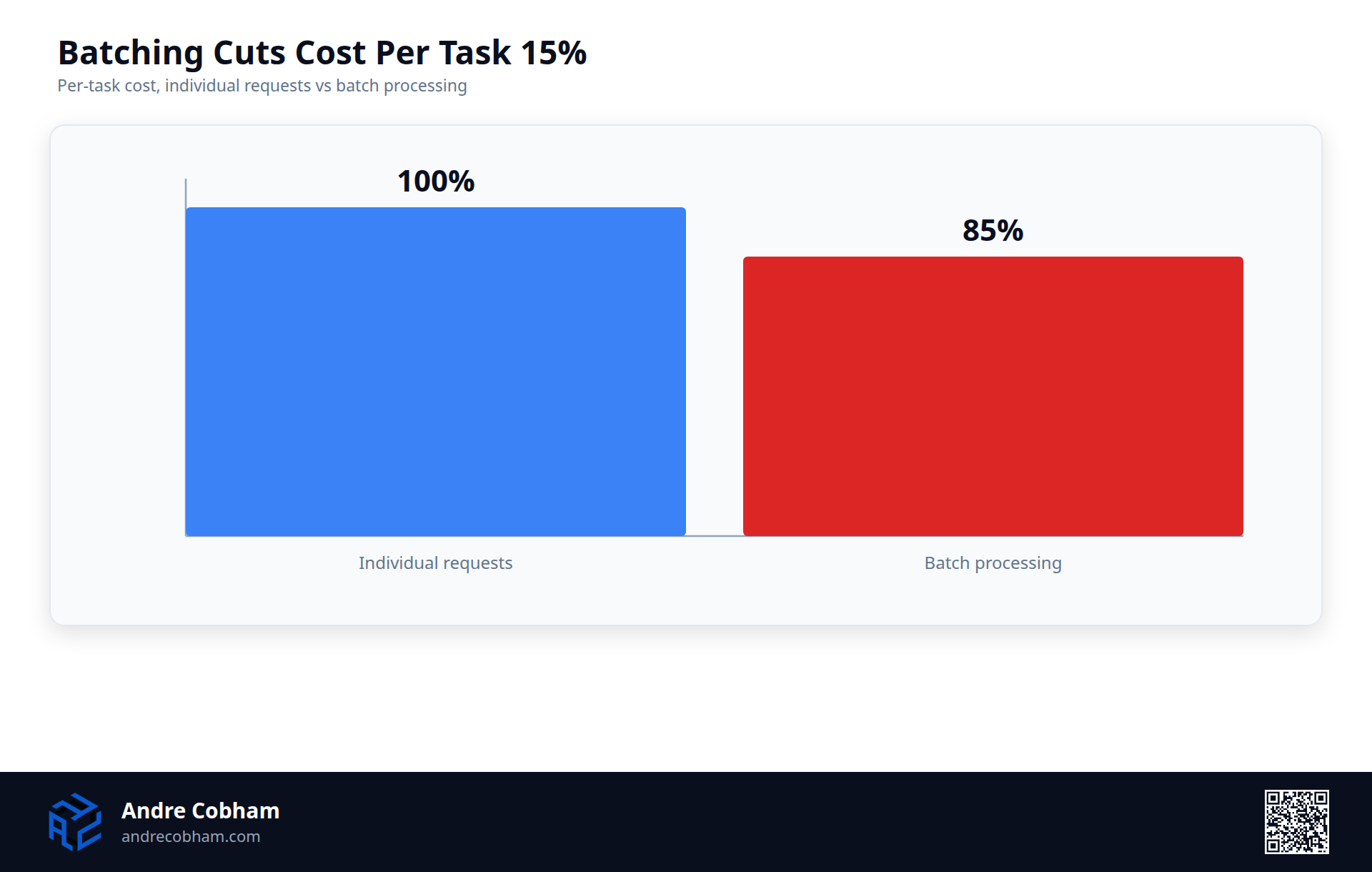
Flash delivers first token in 300-400 milliseconds and throughput of 5,000-10,000 tokens per second. That is fast enough for real-time automations like email triage or support ticket routing. Measured on a live helpdesk processing 200 tickets per day using batch processing, which reduces per-task cost by 15% compared to individual requests.
Context caching is the lever most SMB builders miss. When you cache a document or system prompt exceeding 1,024 tokens, you pay $0.01875 per million cached tokens, which is 25% of standard input cost. One client workflow had cached context making up 60% of total input, reducing effective per-request cost from $0.30 to $0.13. That is real savings at scale.
The Workspace Integration Advantage
In my experience, the reason Google's stack makes economic sense for Workspace customers is not model pricing. It is the integration surface. The data is already in Drive, Gmail, Calendar, and Sheets. Authentication is established. Permissions are configured. Building an agent that reads Gmail, writes output to Sheets, and triggers on Calendar events requires identifying the workflow and writing the connection, not negotiating a new vendor contract or building a custom data pipeline.
Lead intake triage built using both Gemini API with Workspace and OpenAI with custom integration showed a clear winner. The Workspace path was faster to deploy, easier to maintain, and produced fewer edge cases. The difference was not model capability. It was integration friction. Gemini also handles native Workspace document formats without conversion steps: Google Docs pass directly, Gmail threads retain sender and metadata intact. That is a real reduction in preprocessing work.
Google AI Studio versus Vertex AI for Production
Google AI Studio is the free interface at ai.google.com: 60 requests per minute, no API key, no authentication. Vertex AI is the production platform with monitoring, logging, and audit trails. For the first build, AI Studio is the right starting point. The free tier gives 1 million tokens per day, enough for complete workflow validation. Once proven and scaled, Vertex AI provides the monitoring and audit trails that matter in production. The transition is clean: prompts and logic move exactly as-is.
What the Free Tier Actually Lets You Validate
The free API tier for Gemini is not a demonstration environment. It is a fully functional testing surface that supports complete workflow validation at meaningful throughput. Full invoice extraction pipelines, classification systems, and structured content generation workflows have been validated on the free tier before committing any budget to a client build. The rate limits exist, but they are high enough to validate that the workflow produces correct output at the quality level the business needs before the first dollar is spent.
This changes the risk profile of the first build entirely. A business owner or a developer building for one can validate the entire automation, end to end, before spending anything. The commitment comes after proof. That is the correct model for an SMB making a first AI infrastructure decision. The risk in most first builds is not the technical execution. It is committing budget to a platform or approach that turns out not to fit the workflow. The free tier eliminates that risk category entirely, and that matters more than any pricing comparison between providers.
Google Cloud Startup Credits
Google Cloud offers $200-$500 in startup credits for qualifying companies, valid for 12 months. These remove the decision risk of committing to the platform. A startup can build and validate production workflows at scale for zero cost. By the time credits expire, the business has proven the approach works or learned it does not, with zero financial risk. The credits get you to proof, and proof justifies the spend.
Gemini 2.5 Flash versus GPT-4o Mini and Why Context Matters
Building the same extraction workflows in both Gemini Flash and OpenAI's GPT-4o mini, and the results force a nuanced answer. Flash is faster and cheaper and produces better structured output when the extraction task is well-defined. GPT-4o mini is stronger when the task requires reasoning about ambiguous or incomplete information. For SMBs, that distinction matters in specific categories: invoice extraction favors Flash, document classification favors Flash, email routing favors Flash. Complex decision logic favors mini.
The choice is not one provider and exclude the other. Selection is based on the workflow. A lead qualification system that needs to understand unclear intent in prospect emails uses mini. A straightforward invoice line-item extraction uses Flash. The fact that you can make that choice based on workflow profile, not vendor loyalty, is the position SMBs should be in. The cost difference is large enough that picking wrong costs real money.
MCP Server Support for Custom Tools
Google added Model Context Protocol server support to the Gemini API, which means custom tools and integrations connect directly to the model without building an orchestration layer first. A workflow that queries a database, calls a webhook, or checks real-time data can define those connections as MCP servers and pass them to the model in a single API call. This eliminates custom wrapper code and lets the model make tool decisions autonomously.
Gemini Nano and On-Device Inference
Gemini Nano is the on-device inference component for workflows where data cannot leave the organization's environment. For healthcare, legal, or financial services businesses, this handles the backlog subset they assume cannot be automated. Nano is not Flash-level accurate on complex extraction, but viable for simpler classification and triage. It handles tasks that represent 20-40% of some automation backlogs: no API cost, no data residency requirements, no network latency.
Imagen 3 and When to Use It Alongside Gemini
In my experience, imagen 3 is Google's image generation model, priced at $0.04 per image at standard resolution. Imagen 3 fits workflows that generate visual content alongside text, such as business proposals, mockups, or summary visuals. One workflow generates proposals with custom hero images for each client at roughly $0.07 per proposal. The task that previously took a designer 2 hours now takes 30 seconds. Gemini Vision handles the opposite problem: understanding existing images and extracting structured data from them.
API Stability and Platform Maturity
Google has not deprecated any core Gemini models in the past 18 months. The changes have been additive: new models, new features, quota enhancements. No breaking changes in the API contract. That stability matters when you build automation that runs unsupervised in production. The only significant change was granular quota management in Vertex AI, which improved observability without breaking existing deployments.
What Google I/O 2026 Confirmed
Google I/O 2026 announced Managed Agents in the Gemini API, the Antigravity agentic platform, and Flash models explicitly redesigned for loop-based agent execution rather than single-turn responses. This is the direction production builds have been moving toward: agent pipelines that execute tasks autonomously across multiple steps, handle exceptions, and log outcomes without a human in the loop for each decision. The infrastructure announced at I/O is the API surface those pipelines run on, and it is available now.
The practical significance for businesses already on Workspace is that the agentic layer connects directly to the data and workflow surfaces they already use. An agent that monitors a Gmail inbox, classifies incoming requests, routes them to the correct team member, updates a Sheets tracker, and sends a confirmation response is not a complex technical build on Google's stack. It is a straightforward connection of capabilities that are already integrated with each other. That is what production-ready agentic infrastructure looks like, and it is live today for any business willing to build it.
Why the Economics Work Now
Six months of production billing confirms a different kind of advantage than benchmark leadership. Businesses already on Google Workspace have integrations, data structure, and authentication in place. Adding an agent layer requires identifying the workflow and building the connection, not migrating to a new platform. Each new automation shares the same integration surface as the one before it.
The recommendation is not "use Google because the model is best." The recommendation is "use Google because the integration surface you already have reduces cost and timeline of every build, the free tier removes risk from the first build, and Flash delivers the output quality SMB workflows need at a price that makes the economics work." That is an operational advantage that compounds with every workflow you automate.
"Six months of production billing confirms what benchmarks cannot: at the task volume SMBs actually run, Flash delivers the output quality needed at the cost that makes the economics work. The escalation to Pro is the exception, not the rule."
Stay Current
Get notified when I publish.
No newsletter cadence. No filler. I write when there is something worth saying about AI systems, infrastructure, and what is actually working in practice.
30 Minutes. Honest Assessment. No Pitch.
You describe what is eating your time. I tell you honestly whether I can fix it, what it takes, and what it costs.